Open beta · TestFlight · Free

Your pastor says the verse.It’s already open.

Berea listens along in church and turns to every passage as it is preached — named outright, quoted in passing, or only alluded to. When the service ends it keeps the whole message: transcript, outline, questions. On your iPhone, offline, with no account.

iPhone · iOS 26 · No account · No waitlist · Nothing to cancel

From the pulpit

“His divine power has given us everything we need for life and godliness.

Berea hears the reference inside the sentence — including older phrasing, so a King James quotation still lands while you read a modern translation — and turns the page before you could have found it.

References caught

LISTENING 21:15
  • Romans 8:1–2turn-to request0:12
  • Isaiah 53:5quoted, unnamed6:40
  • Psalm 103:12alluded to14:02
  • 2 Peter 1:3quoted, unnamed21:15

Tap any one of them to open it. Nothing flashes, nothing buzzes.

0
Accounts. No email, no profile, no server holding a copy
0
Audio files kept. Speech becomes text as it goes, then it is gone
3
Translations bundled inside — WEB, KJV, Berean Standard
1
Tap to start. Then put the phone down and listen

01

It finds the passage before you can.

One tap when the preaching begins. Berea recognises what is being read, whether the reference is announced or buried in a sentence, and turns the reader to it in time with the message. Your eyes stay on the page instead of a search field.

  • Catches quotations, not just chapter-and-verse
  • Runs on the phone, so a basement chapel with no signal is fine
  • Quiet by design — nothing flashes or buzzes mid-sermon
What the preacher saysWhat Berea does
“Turn with me to the eighth chapter of Romans”Opens Romans 8
Quotes the verse without naming itMatches the wording, opens it anyway
Quotes the King James while you read WEBRecognises the older phrasing
Alludes to a passage in passingLists it so you can decide
Preaches for fifty minutesKeeps every reference in order

02

Sunday, still legible on Thursday.

When the service ends, the message becomes a document you would actually re-read: a transcript set in sections, the big idea, the main points, every passage cited, and questions to carry into the week. Berea titles it and attributes it for you.

  • References sit inline, marked, exactly where they were said
  • Key points, application questions, and a recall quiz
  • Export as PDF or Markdown for the small group

Saved automatically

No Condemnation

Pastor James Okonkwo · Sunday

  1. The verdict has already been given
  2. Law could not do what the Spirit does
  3. Living as people no longer condemned
Transcript4 referencesQuizExport
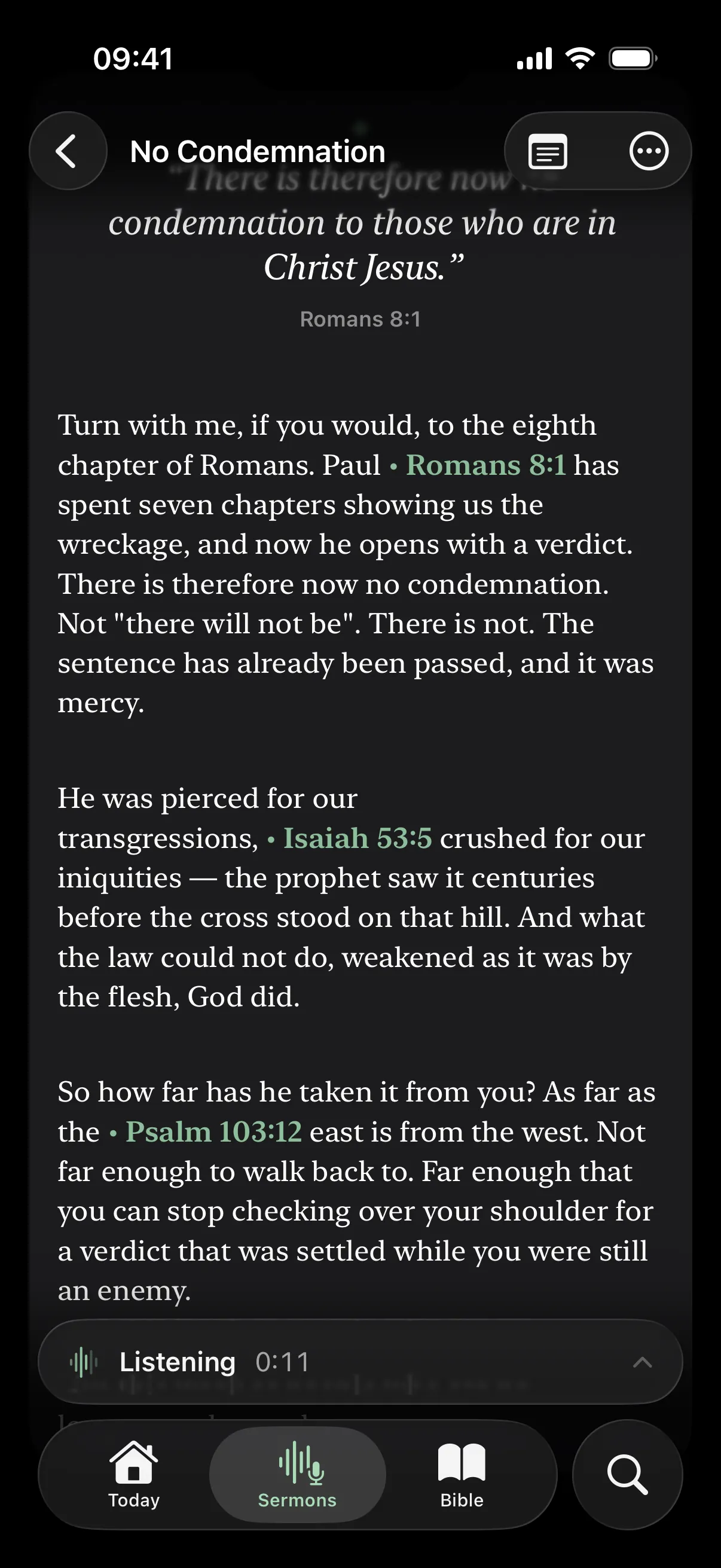
A saved sermon titled No Condemnation, with Romans 8:1, Isaiah 53:5 and Psalm 103:12 marked inside the transcript
The transcript, with every reference caught in place.

03

Ask about what your own pastor said.

The study companion is grounded in the sermons you have actually sat under. Ask how your church has taught on suffering, or what was said about Romans last month, and it answers from your own library rather than the open internet — quoting the preacher from the transcript, never from memory.

  • Search by topic, speaker, or passage
  • Runs on-device with Apple Intelligence
  • It sends you back to the preaching and the text, not away from them

You ask

What has our church taught about suffering this year?

Answered from your library

Three messages touched it directly. In “No Condemnation” the point was that suffering is no longer evidence of a verdict against you — Romans 8:1 was the anchor.

Drawn from 3 of your sermons · nothing left the phone

04

A reader worth staying in.

Poetry set as poetry, the words of Jesus in red, section headings where the translators put them. Choose your typeface and your paper, then mark what matters in five inks and three pen styles. Notes and bookmarks sit beside the text, and all of it works with the phone in airplane mode.

  • Georgia, Gentium, or Lexend — on light, sepia, or dark paper
  • Highlight, underline, or box, in five inks tuned to each paper
  • Notes, bookmarks, reading plans, and shareable verse cards
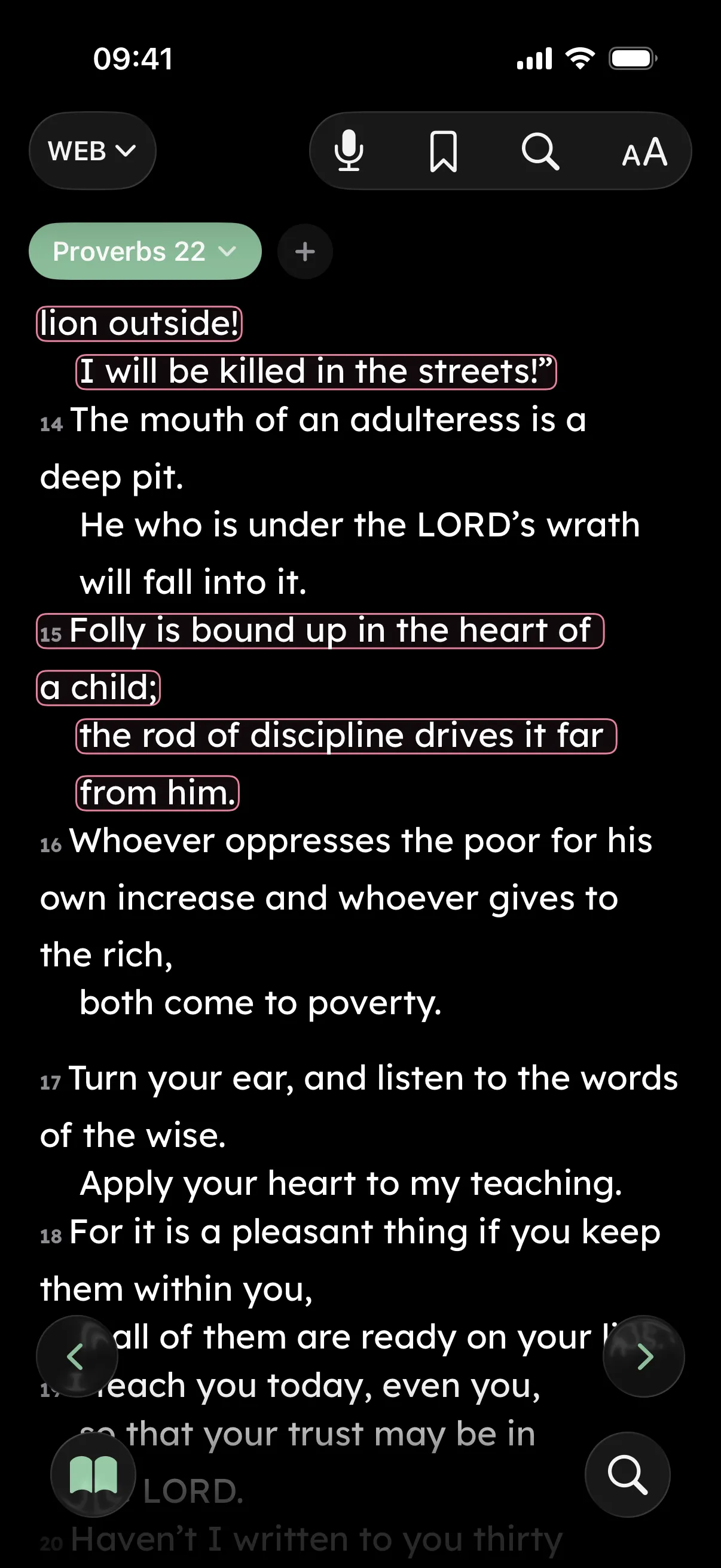
Proverbs 22 in the reader, verses boxed in a pink pen
Boxed marks, dark paper.
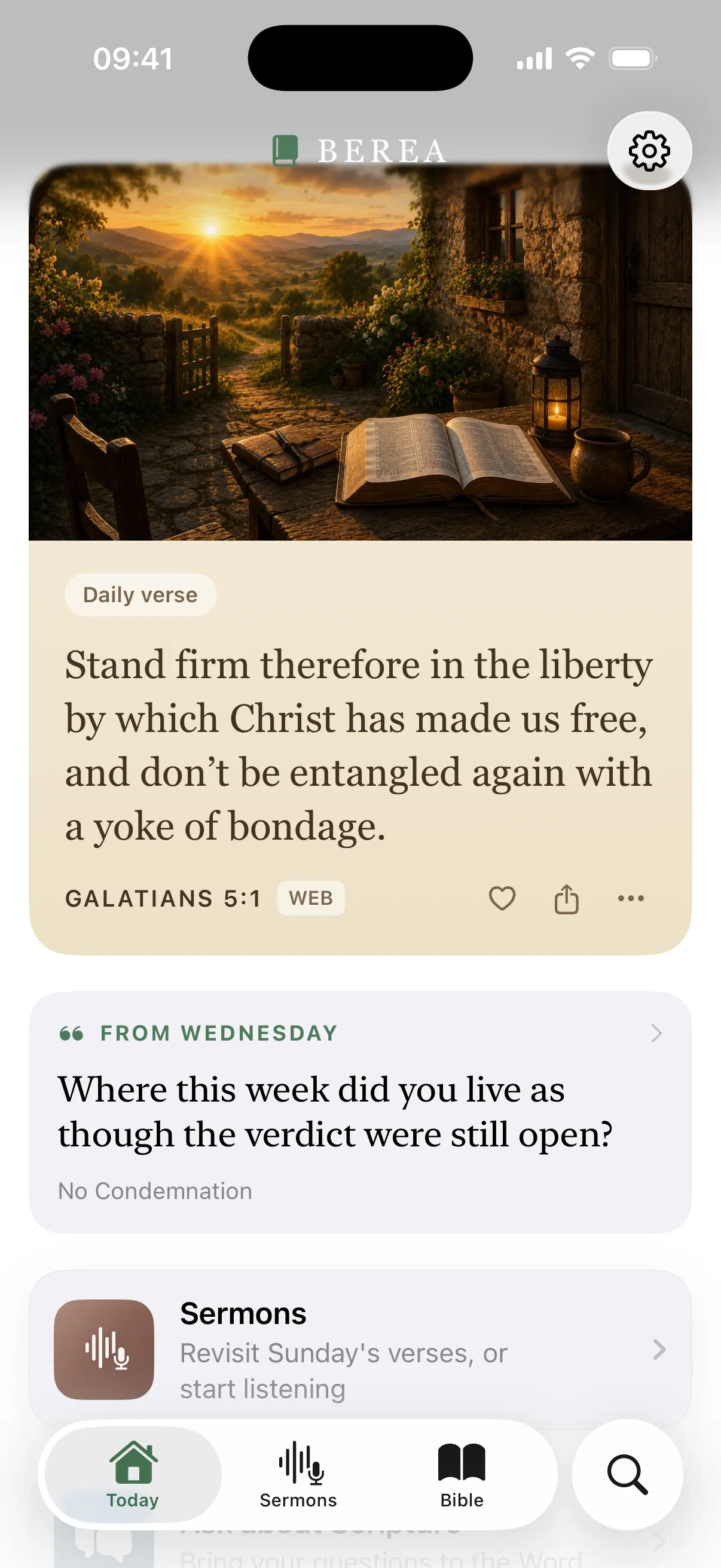
Today screen with the daily verse on light paper and a reflection question carried over from Wednesday
Today, on light paper.

Free, no waitlist, about a minute to set up.

Join the beta on TestFlight
Why this one

The difference is where it runs.

Smart Bible apps exist now, and the good ones are genuinely good. Berea’s bet is different: a sermon is your pastor’s voice and your own notes on it, so the listening, the transcript, and the answers stay on the phone in your pocket — not on a server with your name on it.

What is being comparedBereaThe typical smart Bible app
The listening runsOn your iPhoneOn a server
AccountNone, everSign-up and profile
Sermon audioNever stored, anywhereUploaded for processing
No signal in the pewsEverything still worksNeeds a connection
PriceFree — Premium only for two optional cloud featuresSubscription

“Typical” means cloud-first apps in this category generally; check any app’s own privacy policy — including ours.

Why “Berea”
“Now these were more noble than those in Thessalonica, in that they received the word with all readiness of mind, examining the Scriptures daily to see whether these things were so.”
— Acts 17:11 · World English Bible

The Bereans listened to the preaching with open Bibles, then went and checked it for themselves. That is the whole idea, and the reason this app carries their name.

The journal

Notes from the build.

One developer, writing down what changed and why — releases, what Follow Along is getting wrong, and the decisions behind keeping everything on the phone.

Read every post
Questions

Straight answers.

How do I get it? Is it on the App Store?

Not yet. Berea is in open testing, so you install it through TestFlight, Apple’s own app for beta software: install TestFlight, open the invite, tap Accept and then Install. No waitlist, no invite code, nothing to pay.

TestFlight builds expire ninety days after they are posted, so you will be offered a fresh one from time to time. When Berea reaches the App Store you install the release straight over the test build and keep everything you have saved.

Is it recording my pastor?

No. The microphone is live only while Follow Along is running, and speech becomes text as it goes — no audio file is ever created, on your phone or anywhere else. What remains afterwards is the transcript, in local storage. Even so, record only where your church is happy for you to, and respect any local rules about recording.

Does it work without a signal?

Yes. The whole Bible is bundled inside the app, transcription runs on your device, and the study companion uses Apple Intelligence locally. A church basement with no bars is exactly what it was built for. Only the two optional Premium features need a connection.

Do I need an account?

No. There is no sign-up and no profile, because there is no server holding a copy of your reading, your notes, or your sermons. Delete the app and everything it held is gone.

What does it cost?

The app is free: following along, sermon capture, the reader, search, and the on-device companion. Premium covers only the two features that use the cloud — Deeper Answers and Enhanced accuracy.

While Berea is in TestFlight, purchases run in Apple’s sandbox, so both are free to try and no card is charged. Sandbox subscriptions also run on an accelerated clock, so don’t be surprised if one renews or lapses while you are testing.

Do my sermons leave my phone?

Sermon transcripts stay in local storage and are never uploaded. The on-device companion can search them; the optional cloud chat deliberately cannot, because it is never given access to your sermon library.

If you turn on Enhanced accuracy, live audio is streamed for transcription and returned as text, with nothing retained. That choice is yours and it is off unless you make it.

Which translations are included?

The World English Bible, the King James Version, and the Berean Standard Bible, all three bundled for offline reading, with poetry, section headings, and the words of Jesus properly typeset. More can be downloaded from inside the app.

Do I need Apple Intelligence?

Reading, Follow Along, sermon capture, search, and every study tool work on any iPhone running iOS 26. The on-device study companion needs a device with Apple Intelligence; if yours doesn’t have it, everything else still works.

What is actually useful to report?

Above all, a passage Follow Along should have caught and missed, or one it turned to wrongly. Tell me the church, the phrasing the preacher used, and roughly when it happened. Rough edges in the reader and anything that drains the battery through a service are worth hearing about too.

Take a screenshot and choose Share Beta Feedback, or open TestFlight and tap Send Beta Feedback. It comes straight to me.
Still unanswered? The full privacy policy spells out the two optional features that use the network, and what each of them sends.

About a minute to set up

01

Install TestFlight

Apple’s own free app for beta software. Skip this if you already have it.

02

Open the invite

Tap the button below, then Accept and Install. No code to enter, no waitlist.

03

Start Follow Along

One tap when the preaching begins. That is all the testing I need.

Bring it to churchthis Sunday.

If Follow Along misses a passage your preacher clearly quoted, that is the single most useful thing you can send me. Screenshot it and choose Share Beta Feedback.